Getting Started
We will build a simple workflow using the minimum configuration required for tfaction.
- Create
tfaction.yaml - Create
tfaction-root.yaml - Install Terraform
- Create a GitHub App
- Create a GitHub Actions workflow
We'll create the following files:
.github/workflows/
  test.yaml
  apply.yaml
aqua.yaml
tfaction-root.yaml
tfaction.yaml
main.tf
Prerequisites
Create a GitHub repository. In this guide, you will set up tfaction and learn by running GitHub Actions. Once you are done, you can safely archive the repository.
Create a Root Module
Create a simple root module using null_resource.
For this example, we use Terraform's Local Backend.
In real-world use cases, you would typically use something like the S3 backend to persist state, but we will omit that here for simplicity.
resource "null_resource" "foo" {}
Although tfaction supports monorepos, in this chapter we create a single root module at the repository root.
tfaction.yaml
Create tfaction.yaml in the root module directory.
tfaction.yaml defines settings specific to each root module.
For now, an empty object {} is sufficient.
{}
tfaction recognizes directories containing tfaction.yaml as root modules.
In other words, CI will not run in directories that do not contain tfaction.yaml.
tfaction-root.yaml
Create tfaction-root.yaml at the repository root.
This file defines global tfaction settings.
Below is the minimum required configuration:
plan_workflow_name: test.yaml
available_providers:
  - name: registry.terraform.io/hashicorp/null
target_groups:
  - working_directory: ""
plan_workflow_nameis required and specifies the file name (not the workflow name) of the GitHub Actions workflow that runsterraform plan.available_providersis required and specifies the list of available providers.target_groupsis required and defines root module groups and their specific settings. In this example, we do not apply any special configuration.
Install Terraform
Terraform must be installed.
tfaction internally uses aqua.
If you create an aqua.yaml file and manage Terraform with aqua, tfaction will automatically install it.
# yaml-language-server: $schema=https://raw.githubusercontent.com/aquaproj/aqua/main/json-schema/aqua-yaml.json
registries:
  - type: standard
    ref: v4.512.0 # renovate: depName=aquaproj/aqua-registry
packages:
  - name: hashicorp/terraform@v1.15.3
You may also install required tools using methods other than aqua.
If you use hashicorp/setup-terraform, note that due to a known bug you need to set terraform_wrapper to false:
- uses: hashicorp/setup-terraform@b9cd54a3c349d3f38e8881555d616ced269862dd # v3.1.2
  with:
    terraform_wrapper: false
- https://github.com/hashicorp/setup-terraform/issues/9
- https://github.com/hashicorp/setup-terraform/issues/328
Using aqua also allows you to install tools such as tflint and trivy.
Since Terraform is typically executed locally as well, it is recommended to use a version manager like aqua to keep versions consistent between local environments and CI.
Create a GitHub App
Create a GitHub App that tfaction will use to create commits and PRs.
Although you can use GitHub Actions' GITHUB_TOKEN, it does not trigger new workflow runs when pushing commits, which can be inconvenient.
Personal Access Tokens are also less recommended due to user management overhead, lack of commit signing, and token rotation complexity.
A GitHub App is recommended instead.
Create the GitHub App with the following settings:
- GitHub App name: Must be globally unique. Prefixing it with the GitHub App owner name helps ensure uniqueness.
- Homepage URL: Any value is fine. For example: https://github.com/suzuki-shunsuke/tfaction
- Webhook: Disable (uncheck
Active) - Permissions:
- Repository Permissions:
- Actions: Read (to download plan files from GitHub Artifacts during apply)
- Contents: Write (can be reduced to Read if using Securefix Action)
- Pull requests: Write (to post comments and add labels to PRs)
- Repository Permissions:
After creating the GitHub App, install it in the repository where tfaction will run via "Install App". From the App Settings page, generate a Private Key. Download it and register it as a Repository Secret. Also register the App ID as a Repository Variable.
Create the Workflow for PRs
Create a workflow that runs terraform plan on the pull_request event.
name: test
on: pull_request
jobs:
  plan:
    timeout-minutes: 30
    runs-on: ubuntu-24.04
    permissions:
      contents: read
    env:
      TFACTION_JOB_TYPE: terraform
    steps:
      - name: Checkout Repository
        uses: actions/checkout@de0fac2e4500dabe0009e67214ff5f5447ce83dd # v6.0.2
        with:
          persist-credentials: false

      - name: Create GitHub App installation access token
        uses: actions/create-github-app-token@29824e69f54612133e76f7eaac726eef6c875baf # v2.2.1
        id: token
        with:
          app-id: ${{ vars.APP_ID }}
          private-key: ${{ secrets.PRIVATE_KEY }}
          permission-contents: write
          permission-pull-requests: write

      - name: Set up
        uses: suzuki-shunsuke/tfaction@latest
        with:
          action: setup
          github_token: ${{ steps.token.outputs.token }}

      - name: terraform init
        uses: suzuki-shunsuke/tfaction@latest
        with:
          action: terraform-init
          github_token: ${{ steps.token.outputs.token }}

      - name: Plan
        uses: suzuki-shunsuke/tfaction@latest
        with:
          action: plan
          github_token: ${{ steps.token.outputs.token }}
Create a PR
Create a pull request and let the workflow run.
The first CI run will fail, and .terraform.lock.hcl will be generated.
The result of terraform plan will be commented on the PR using tfcmt.
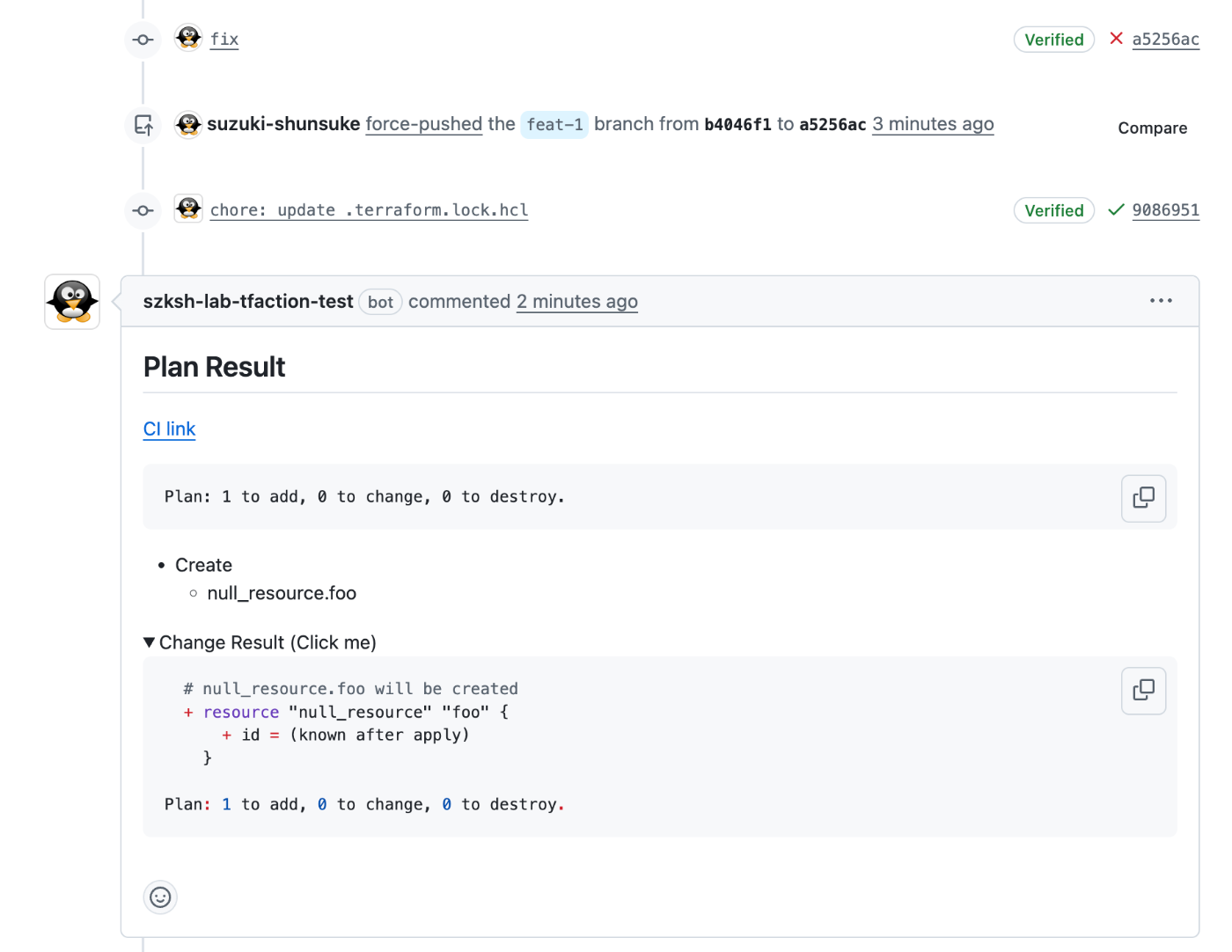
Labels are also added to the PR based on the result.
Review the comment, and if everything looks good, merge the PR.
After merging, terraform init and apply will run, and the results will be posted as a PR comment.
Create the Workflow for Apply
---
name: apply
on:
  push:
    branches:
      - main
jobs:
  apply:
    timeout-minutes: 60
    runs-on: ubuntu-24.04
    permissions:
      contents: read
    env:
      TFACTION_JOB_TYPE: terraform
    steps:
      - name: Checkout Repository
        uses: actions/checkout@de0fac2e4500dabe0009e67214ff5f5447ce83dd # v6.0.2
        with:
          persist-credentials: false

      - name: Create GitHub App installation access token
        uses: actions/create-github-app-token@29824e69f54612133e76f7eaac726eef6c875baf # v2.2.1
        id: token
        with:
          app-id: ${{ vars.APP_ID }}
          private-key: ${{ secrets.PRIVATE_KEY }}
          permission-actions: read
          permission-contents: write
          permission-pull-requests: write

      - name: Set up
        uses: suzuki-shunsuke/tfaction@latest
        with:
          action: setup
          github_token: ${{ steps.token.outputs.token }}

      - name: terraform init
        uses: suzuki-shunsuke/tfaction@latest
        with:
          action: terraform-init
          github_token: ${{ steps.token.outputs.token }}

      - name: Apply
        uses: suzuki-shunsuke/tfaction@latest
        with:
          action: apply
          github_token: ${{ steps.token.outputs.token }}
After adding this workflow, merge the PR.
terraform apply will run, and the results will be posted as a PR comment.
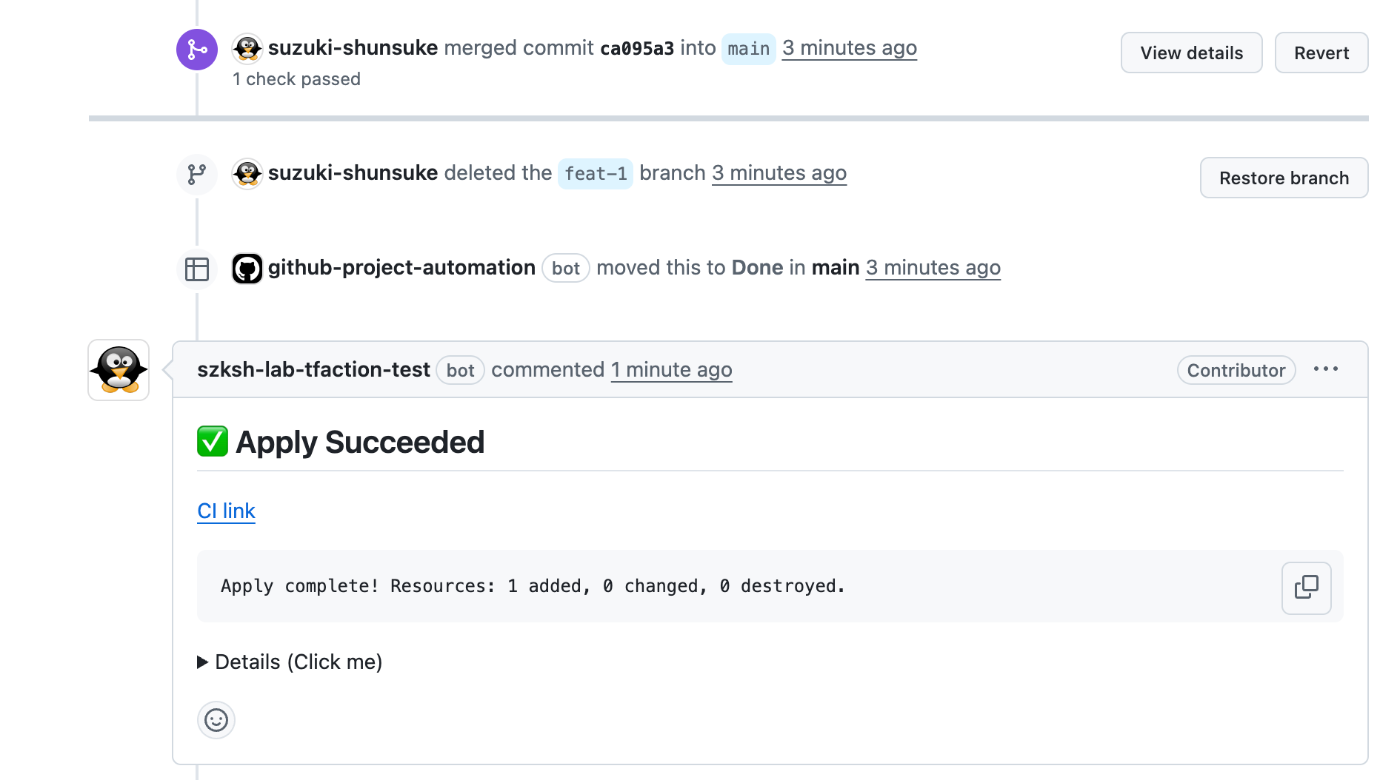
At this point, you have successfully built a simple workflow using tfaction. For a workflow of this simplicity, you could implement it without tfaction, so its advantages may not yet be fully apparent. In the following chapters, we will explore the various features of tfaction.